



CREATE EXTERNAL TABLE
说明
外部表功能是对现有SQL加载器功能的补充。它使您能够访问外部源中的数据,就像访问数据库中的表中的数据一样。
参数
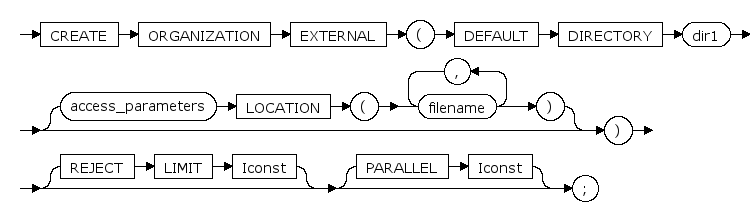
ORGANIZATION EXTERNAL
创建外部表关键字
DEFAULT DIRECTORY dir1
外部表文件路径,(参见 CREATE DIRECTORY )
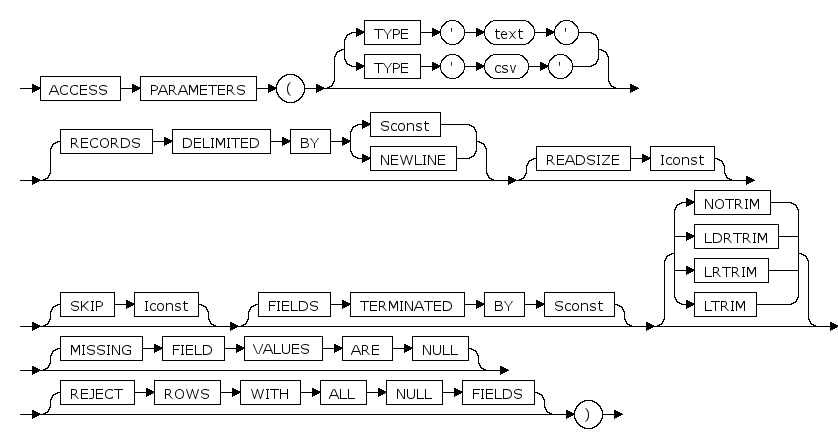
ACCESS PARAMETERS
外部表参数类型关键字
TYPE 'text' | TYPE 'csv'
外部表文件数据类型
RECORDS DELIMITED BY { Sconst | NEWLINE }
指定外部表中一行数据记录结束标志(某个字符或者换行)
READSIZE Iconst
读取缓存空间大小
SKIP Iconst
忽略文件前几行
FIELDS TERMINATED BY Sconst
指定外部表中数据列之间的分隔符
NOTRIM | LDRTRIM | LRTRIM | LTRIM
仅语法支持,无实际意义
MISSING FIELD VALUES ARE NULL
字段值为空时将其值设为 NULL
REJECT ROWS WITH ALL NULL FIELDS
字段全部为空的行将不会加载
LOCATION ( filename [, ... ] )
外部表文件名
REJECT LIMIT Iconst
加载数据时最多允许出现的错误记录数
PARALLEL Iconst
仅语法支持,无实际意义
注解
1.外部表暂不支持dml操作中的update、delete。
2.外部表暂不支持创建索引。
3.外部表不可以是分区表
4.神通的外部只支持 tbl、cvs 后缀的文件,文件格式和普通的txt格式一样,解析规则在语法中指定。
示例
示例1:创建一个普通的外部表
drop directory dir1;
declare
   va varchar2;
BEGIN
    select VALUE into va from v$parameter where NAME ='EXTERN_DATA_DIR_PATH';
    EXECUTE IMMEDIATE 'create directory dir1 as '||''''||va||'''';
END ;
/
drop table t1;
create table t1(a int, b varchar(20))
organization external
(
        default directory dir1
        access parameters
                (
                        type 'text'
                        records delimited by newline
                        readsize 100
                        skip 1
                        fields terminated by '|'
                        notrim
                        missing field values are null
                        reject rows with all null fields
                )
        location ('example01.tbl')
)
reject limit 1
parallel 1

;
select * from t1;
A(int)      |B(varchar)      |
----------------------------
1           |one             |
----------------------------
2           |two             |
----------------------------
3           |three           |
总数目:3


--查询系统表信息
select relkind from sys_class where relname='T1';<<RESULT('e');

select count(*) from sys_external_table;
COUNT(int)      |
----------------
1               |
总数目:1

drop directory dir1;
drop table t1;
示例2:创建外部表加载csv类型的文件
--支持csv文件类型
drop table t1;
declare
   va varchar2;
BEGIN
    select VALUE into va from v$parameter where NAME ='EXTERN_DATA_DIR_PATH';
    EXECUTE IMMEDIATE 'create directory dir1 as '||''''||va||'''';
END ;
/
create table t1(a int, b varchar(20))
organization external
(
        default directory dir1
        access parameters
                (
                        type 'csv'
                        records delimited by newline
                        readsize 100
                        skip 1
                        fields terminated by '|'
                        notrim
                        missing field values are null
                        reject rows with all null fields
                )
        location ('example01.csv')
)
reject limit 1
parallel 1

;
--查询系统表信息
select FILETYPE from sys_external_table where relname='T1';<<RESULT('c');


select * from t1;
A(int)      |B(varchar)      |
----------------------------
1           |one             |
----------------------------
2           |two             |
总数目:2
示例3:对外部表进行ddl操作和增删改操作
--测试外部表能否使用insert、delete、update语句
drop table t1;
create table t1(a int, b varchar(20))
organization external
(
        default directory dir1
        access parameters
                (
                        type 'text'
                        records delimited by newline
                        readsize 100
						skip 1
                        fields terminated by '|'
                        notrim
                        missing field values are null
                        reject rows with all null fields
                )
        location ('example01.tbl')
)
reject limit 1
parallel 1

;
select * from t1;
A(int)      |B(varchar)      |
----------------------------
1           |one             |
----------------------------
2           |two             |
----------------------------
3           |three           |
总数目:3

insert into t1 values(4,'four');
delete from t1;
ERROR, 特性不支持, 不支持删除外部表

update t1 set a=1;
ERROR, 特性不支持, 不支持更新外部表


--测试外部表能否创建索引
drop index idx1 cascade;
create index idx1 on t1(a);
ERROR, 不支持在外部表上创建索引

drop index idx1 cascade;

-- 测试外部表能否创建视图
drop view v1 cascade;
create view v1 as select * from t1;
drop view v1 cascade;
示例4:创建大对象类型的外部表
--测试外部表是否支持clob类型
drop table t1;
create table t1(a clob, b varchar(20))
organization external
(
        default directory dir1
        access parameters
                (
                        type 'text'
                        records delimited by newline
                        readsize 100
						skip 1
                        fields terminated by '|'
                        notrim
                        missing field values are null
                        reject rows with all null fields
                )
        location ('example01.tbl')
)
reject limit 1
parallel 1

;
select * from t1;
A(clob)      |B(varchar)      |
-----------------------------
1            |one             |
-----------------------------
2            |two             |
-----------------------------
3            |three           |
-----------------------------
4            |four            |
总数目:4

--测试外部表是否支持blob类型
drop table t1;
create table t1(a blob, b varchar(20))
organization external
(
        default directory dir1
        access parameters
                (
                        type 'text'
                        records delimited by newline
                        readsize 100
						skip 1
                        fields terminated by '|'
                        notrim
                        missing field values are null
                        reject rows with all null fields
                )
        location ('example01.tbl')
)
reject limit 1
parallel 1

;
select * from t1;
A(blob)      |B(varchar)      |
-----------------------------
0x01         |one             |
-----------------------------
0x02         |two             |
-----------------------------
0x03         |three           |
-----------------------------
0x04         |four            |
总数目:4