



Rust语言接口简介
Rust 是一门帮助你编写更快、更可靠软件的编程语言。高层工程学与底层控制在其他编程语言设计 中往往是相互矛盾的;通过平很强大的技术能力与优秀的开发体验,Rust 提供了控制底层细节(比 如内存使用)的选择,并免受通常随之而来的所有烦恼。
神通数据库支持Rust访问数据库并进行操作,访问神通数据库的rust-shentong是从访问Oracle的rust-oracle移植而来,两者保持使用的高度兼容。神通公司开发了兼容odpi的接口stodpi,而rust-oracle是通过Oracle的odpi访问数据库的,因此神通的rust-shentong通过stodpi接口也能很好的访问神通数据库。
目前基于rust-shentong的crate已经发布在crates.io中,名称为shentong,开发这可以到crates.io查阅版本,建议使用最新版本。
rust-shentong接口依赖情况如下,依赖的环境是运行必须的,因此需要注意:
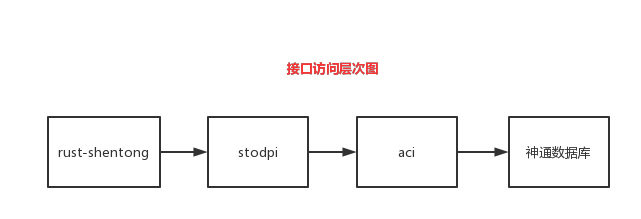
注解
由于基于cargo进行rust编程,cargo要求所有引用的crate都必须是发布到crates.io平台上的,因此离线部署rust-shentong会非常麻烦。当前最新版本为0.5.8版本。
rust-shentong安装
rust-shentong已经发布到crates.io平台中,开发在项目文件Cargo.toml中添加依赖名称如下:
[dependencies] shentong = "0.5.8"
在编译项目时,会下载rust-shentong,下载后的路径一般在cargo的工作目录中,比如:
- Linux环境下的root用户,carog的工作目录为/root/.cargo/
- #Windows环境下的administrator用户,cargo的工作目录为C:\Users\Administrator\.cargo
将rust-shentong拷贝到cargo的工作目录的registry\src\xxx\的目录下即可。
当前rust-shentong的版本最新为0.5.8,则下载后的目录为shentong.0.5.8。
开发者可以到crates.io平台上查看rust-shentong最新版本,搜索shentong即可:https://crates.io/crates/shentong/versions。
由于下载的rust-shentong目录下的odpi文件是空的,但rust-shentong编译是需要odpi接口的,因此cargo build在编译项目时,下载了rust-shentong会自动编译但会失败,原因就是没有odpi接口,需要将神通的stodpi接口源码拷贝到odpi目录下。
使用rust-shentong的demo
创建一个cargo项目test_rust_shentong
1)创建项目:
cargo new test_rust_shentong --bin
2)修改代码
进入到test_rust_shentong项目目录,会有一个Cargo.toml文件,修改文件如下:
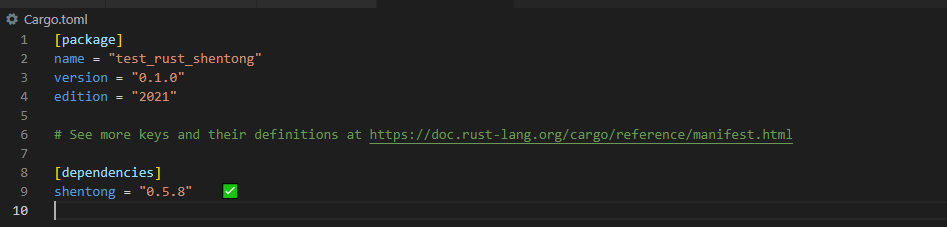
修改src/main.rs文件,输入以下内容:
use shentong::*;
fn main()  -> Result<()> {
    let username = "sysdba";
    let password = "szoscar55";
    let database = "localhost:2003/OSRDB";
    let mut _conn = Connection::connect(username, password, database)?;
    _conn.set_autocommit(true);
    _conn.execute("create table txsss( a int)", &[])?;
    _conn.execute("insert into txsss values(1)", &[])?;
    _conn.execute("insert into txsss values(2)", &[])?;
    _conn.commit()?;
    Ok(())
    println!("Hello, world!");
}
3)编译
进入test_rust_shentong项目目录下,在终端中输入:
cargo build
4)执行
进入test_rust_shentong项目目录下,在终端中输入:
cargo run
执行成功则打印Hello, world!。
5)注意事项
rust_shentong在使用odpi接口时,会校验支持的odpi版本,如果执行过程中报版本不兼容,则需要更新odpi的版本与rust_shentong保持一致。