



DBD-ODBC接口简介
神通数据库可以通过DBD:ShenTong访问数据库,也可以通过DBD-ODBC访问神通数据库。DBD-ODBC是通过ODBC驱动方式访问数据库,它能支持所有支持ODBC驱动的数据库产品。
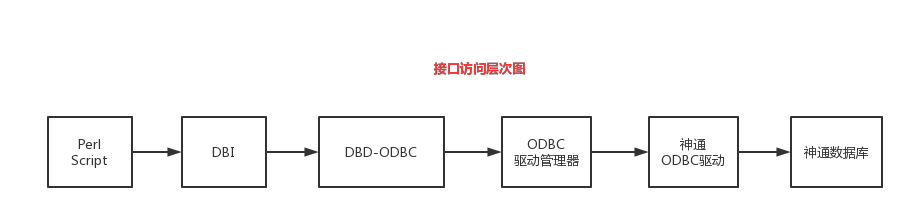
DBD-ODBC安装
ODBC环境配置
请准备好数据库的ODBC环境,并通过驱动管理器测试能正确访问神通数据库。ODBC环境的配置可参考《ODBC程序开发手册》中的内容。
DBD-ODBC安装
1)DBD-ODBC源码下载:https://github.com/perl5-dbi/DBD-ODBC.git
2)编译安装:
cd DBD-ODBC
perl Makefile.PL
make
make install
3)安装后,在/usr/local/lib64/perl5/auto/DBD/目录下会有ShenTong目录,比如:
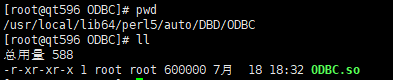
还可以将以下脚本存储为一个check.pl文件中:
#!/usr/bin/perl
use strict;
use ExtUtils::Installed;
my $inst=ExtUtils::Installed->new();
my @modules = $inst->modules();
foreach(@modules){
        my $ver = $inst->version($_) || "???";
        printf("%-12s -- %s\n",$_,$ver);
}
exit;
执行:perl check.pl,如果DBD-ODBC正常安装,会打印如下信息:
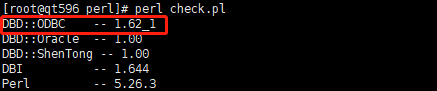
注解
部分老的perl版本不支持上面的检测脚本,可以升级perl解决。
注解
DBD-ODBC编译依赖驱动管理的环境,比如Linux环境下,必须按照UnixODBC的开发包,否则无法寻找到sql.h等头文件。
使用DBD-ODBC的样例
1)数据库中建表:
Drop table test;
Create table test( a int);
Insert into test values(1);
Insert into test values(2);
2)将以下内容存储为dbtest.pl文件:
#!/usr/bin/perl -w
use strict;
use DBI;

my $dbdsn= "odsn";         # 数据源名称
my $driver = "ODBC";           # 接口类型 默认为 localhost
my $database = "osrdb";        # 数据库
# 驱动程序对象的句柄
my $dsn = "DBI:$driver:$dbdsn";
my $userid = "sysdba";            # 数据库用户名
my $password = "szoscar55";        # 数据库密码

# 连接数据库
my $dbh = DBI->connect($dsn, $userid, $password ) or die $DBI::errstr;
my $sth = $dbh->prepare("SELECT * FROM test");   # 预处理 SQL  语句
$sth->execute();    # 执行 SQL 操作

# 循环输出所有数据
while ( my @row = $sth->fetchrow_array() )
{
       print join('\t', @row)."\n";
}

$sth->finish();
$dbh->disconnect();
3)执行dbtest.pl:
perl dbtest.pl
执行结果:
[root@qt596 perl]# perl dbtest.pl
1
2