



Windows平台数据源配置
图形化数据源配置
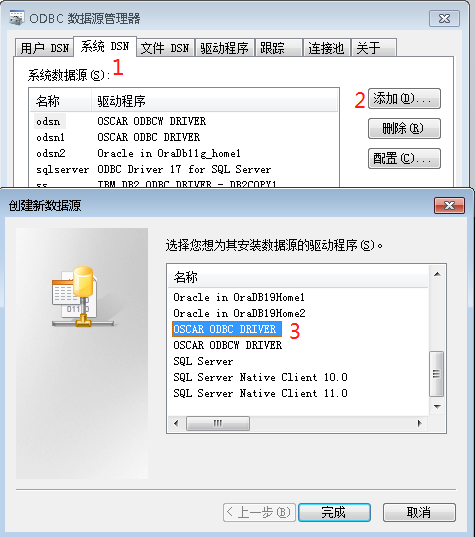
打开odbc数据源管理器,选择”系统DSN””添加”“OSCAR ODBC DRIVER”
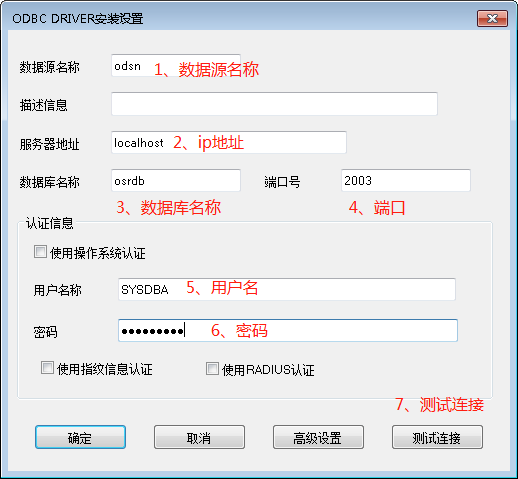
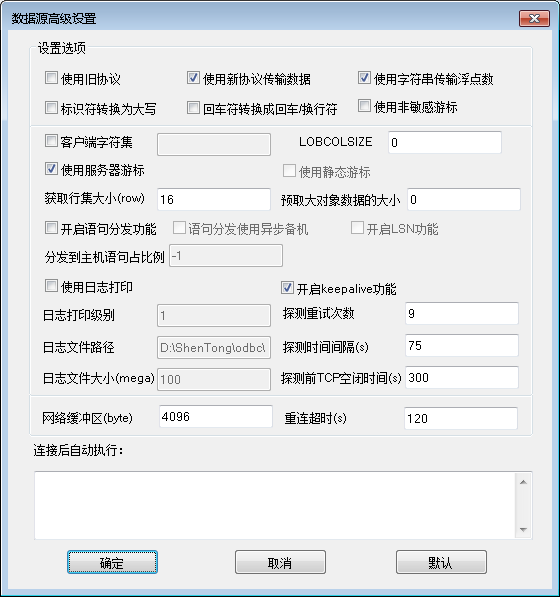
进入神通odbc的配置界面,填入相关信息:
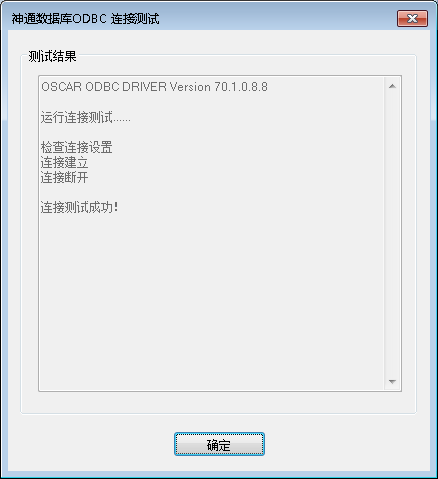
点击 测试连接后,如果成功,则返回如下界面:
人工脚本数据源配置
- 将以下内容复制到stdsn.vbs文件中:
'天津神舟通用数据技术有限公司版权所有 (C) 2003-2021
'使用示例:
            '安装 cscript dsn.vbs /Style:Install /OscarType:odbc /DsnName:osdn /BIT:64
            '卸载 cscript dsn.vbs /Style:UnInstall /DsnName:osdn /BIT:64

'参数列表:
            '参数style:Install标识安装、UnInstall标识卸载,
            '参数OscarType:odbc或者odbcw
            '参数DsnName:数据源的名称
            '参数BIT:使用的系统位数信息

Dim ODBC_WScript,objArgs
Dim Style,DsnName,BIT
Dim RegPath,DirPath
Dim DRIVER,OscarType

WScript.Echo "天津神舟通用数据技术有限公司"
Set objArgs = WScript.Arguments
Set ODBC_WScript=WScript.CreateObject("WScript.Shell")
Style=WScript.Arguments.Named.Item("Style")
BIT=WScript.Arguments.Named.Item("BIT")
DsnName=WScript.Arguments.Named.Item("DsnName")
if DsnName="" then
    WScript.Echo "请输入DsnName参数"
    WScript.quit
end if

if BIT="" then '默认64位
    BIT="64"
end if

if BIT="32" then '32位
    DirPath="HKEY_LOCAL_MACHINE\SOFTWARE\Wow6432Node\"
else
     if BIT="64" then'64位
    DirPath="HKEY_LOCAL_MACHINE\SOFTWARE\"
    else
        WScript.Echo "无效的BIT参数,请使用64/32"
        WScript.quit
    end if
end if

On Error Resume Next
if Style="Install" then
    ODBC_WScript.RegRead(DirPath+"ODBC\ODBC.INI\ODBC Data Sources\"+DsnName)
    if Err.Number=0 then
        WScript.Echo DsnName+"数据源已经存在"
        WScript.quit
    else
        Err.clear
    end if
    OscarType=WScript.Arguments.Named.Item("OscarType")
    if OscarType = "odbc" or OscarType = "ODBC" then
        DRIVER="OSCAR ODBC DRIVER"
    else
        if OscarType="odbcw" or OscarType="ODBCW" then
        DRIVER="OSCAR ODBCW DRIVER"
        else
            WScript.Echo "请输入正确的OscarType类型:odbc/odbcw"
            WScript.quit
        end if
    end if
    RegPath=DirPath+"ODBC\ODBC.INI\"
    ODBC_WScript.RegWrite RegPath+"ODBC Data Sources\"+DsnName,DRIVER
    RegPath = RegPath+DsnName+"\"
    ODBC_WScript.RegWrite RegPath,Default
    ODBC_WScript.RegWrite RegPath+"BulkBufferSize","10"
    ODBC_WScript.RegWrite RegPath+"Charset",Default
    ODBC_WScript.RegWrite RegPath+"ConnResetTimeOut","120"
    ODBC_WScript.RegWrite RegPath+"ConnSettings",Default
    ODBC_WScript.RegWrite RegPath+"CPTimeout","0"
    ODBC_WScript.RegWrite RegPath+"CPTimeToLive","0"
    ODBC_WScript.RegWrite RegPath+"CursorInsensitive","0"
    ODBC_WScript.RegWrite RegPath+"Database","osrdb"
    ODBC_WScript.RegWrite RegPath+"Description",Default
    ODBC_WScript.RegWrite RegPath+"Driver",DRIVER
    ODBC_WScript.RegWrite RegPath+"EnableBulkDriver","0"
    ODBC_WScript.RegWrite RegPath+"EnableDispatch","0"
    ODBC_WScript.RegWrite RegPath+"EnableKeepalive","1"
    ODBC_WScript.RegWrite RegPath+"EnableLog","0"
    ODBC_WScript.RegWrite RegPath+"FetchBufferSize","16"
    ODBC_WScript.RegWrite RegPath+"HostPercentageOfStatement","-1"
    ODBC_WScript.RegWrite RegPath+"KeepaliveCount","9"
    ODBC_WScript.RegWrite RegPath+"KeepaliveIdle","300"
    ODBC_WScript.RegWrite RegPath+"KeepaliveInterval","75"
    ODBC_WScript.RegWrite RegPath+"LfConversion","0"
    ODBC_WScript.RegWrite RegPath+"LobColSize","0"
    ODBC_WScript.RegWrite RegPath+"LobPrefetchSize","0"
    ODBC_WScript.RegWrite RegPath+"LogFilePath","C:\ShenTong\odbc\"
    ODBC_WScript.RegWrite RegPath+"LogFileSize","100"
    ODBC_WScript.RegWrite RegPath+"LogPrintLevel","1"
    ODBC_WScript.RegWrite RegPath+"Port","2003"
    ODBC_WScript.RegWrite RegPath+"ServerName","localhost"
    ODBC_WScript.RegWrite RegPath+"SocketBufferSize","4096"
    ODBC_WScript.RegWrite RegPath+"TransFloatByStr","1"
    ODBC_WScript.RegWrite RegPath+"Upper","0"
    ODBC_WScript.RegWrite RegPath+"UseAsynchronousSlave","0"
    ODBC_WScript.RegWrite RegPath+"UseDeclareFetch","1"
    ODBC_WScript.RegWrite RegPath+"UseNewNet","1"
    ODBC_WScript.RegWrite RegPath+"UseOldProtocol","1"
    ODBC_WScript.RegWrite RegPath+"UserName","SYSDBA"
    ODBC_WScript.RegWrite RegPath+"UserOSAuth","0"
    ODBC_WScript.RegWrite RegPath+"UseServerDbType","0"
    ODBC_WScript.RegWrite RegPath+"UseStaticCursor","0"
    WScript.Echo "数据源"+BIT+"位"+DsnName+"创建成功"
else
    if Style="UnInstall" then
        RegPath=DirPath+"ODBC\ODBC.INI\"
        ODBC_WScript.RegDelete RegPath+DsnName+"\"
        RegPath=RegPath+"ODBC Data Sources\"
        ODBC_WScript.RegDelete RegPath+DsnName
        if Err.Number <> 0 then
            WScript.Echo "数据源"+DsnName+"不存在"
            Err.Clear
        else
            WScript.Echo "数据源"+DsnName+"删除成功"
        end if
    else
        WScript.Echo "请输入正确的Style:Install/UnInstall"
        WScript.quit
    end if
end if
- 执行stdsn.vbs文件:
注册: cscript stdsn.vbs /Style:Install /OscarType:odbc /DsnName:osdn /BIT:64
或者: cscript stdsn.vbs /Style:Install /OscarType:odbcw /DsnName:osdnw /BIT:64
卸载: cscript stdsn.vbs /Style:UnInstall /DsnName:osdn /BIT:64
或者: cscript stdsn.vbs /Style:UnInstall /DsnName:osdnw /BIT:64
ODBC跟踪
系统的odbc数据源管理器提供了跟踪功能,这样可以将程序调用的odbc接口情况写入到跟踪日志文件中,方便分析问题。 打开odbc跟踪的方式如下:
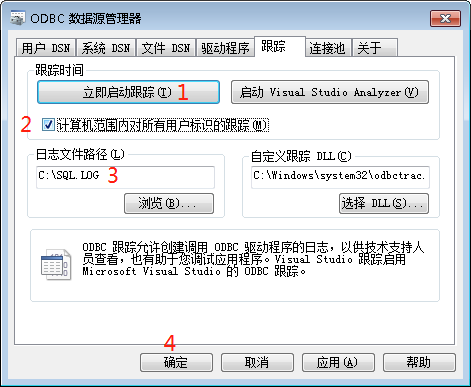
2需要选中;设置好3,点击1,然后点击4,运行程序后,会在C:\SQL.log文件中包含调用odbc接口的日志。